A content calendar is a working overview of what you are preparing, who is responsible, and when the result should be finished, approved, and published. It does not have to look like a day-by-day calendar. For a smaller team, a shared spreadsheet can work well, provided everyone understands its statuses and responsibilities.
A calendar will not decide whether you are writing about the right topics, though. That is the job of content strategy. Its output should be a priority and a reason; the calendar’s job is to turn that decision into work that can be completed and checked.
When you need a calendar
The problem is usually not a lack of ideas. It is worse when nobody knows which idea is approved, whether someone will supply the source material, or why a text is waiting. A calendar helps when several people contribute to content, when it ties into a campaign, or when it needs regular maintenance.




Even for a solo author, it can separate ideas from commitments. But there is no need to introduce a complex project system for a handful of articles. Start with the minimum that solves a real problem, and add fields only when someone uses them to make decisions.
What each row should contain
One row should represent an independently manageable deliverable, such as a new article or an update to an existing page. For a large campaign, you can have a parent overview with individual deliverables underneath. But do not combine several independent deadlines into one vague “done” cell.
| Field | What it is for |
|---|---|
| Topic, type of work, and purpose | Distinguishes a new article, a refresh, or another format and explains who it is for. |
| Priority | Shows the order and the reason the work takes precedence. |
| Owner | Identifies the person responsible for moving the task forward; they do not have to do everything themselves. |
| Status and blocker | Distinguishes work in progress from waiting for specific input. |
| Delivery, approval, publication | Separates three different deadlines and leaves room for corrections. |
| Link to the brief and working file | Points to the current version, not several different email attachments. |
| URL and review date | Makes it possible to find the result after publication and plan maintenance. |
As needed, add a subject-matter expert, approver, graphics link, CMS link, distribution channel, and metric. For SEO content, a main topic or keyword, search intent, and data source can be useful. However, search volume without a market, period, and source for the number is not a complete input.
For refreshes, record the original URL and scope of the change. An update must not accidentally overwrite a live page while still awaiting approval. A CMS link therefore does not, on its own, constitute permission to publish.
Separate delivery, approval, and publication
If all three events share one deadline, there is no room for expert review or preview corrections. An author may deliver the text on time and publication may still be delayed because an approved image is missing. The calendar should reveal this distinction, not hide it.
A starting workflow might be idea → approved brief → creation → subject-matter and language review → approved for publication → published → review. This is a proposed process, not a mandatory set of statuses for every team. For a one-person blog, some steps can be simpler, but their purpose does not disappear.
Always attach what, who, and until when to a “waiting” status. Define “ready to publish” specifically: the content is approved, links and metadata checked, media rights resolved, and the preview verified. Approval of the text is not automatically approval of the campaign timing.
How to fill the calendar without an endless backlog of ideas
Collect ideas from customer research, sales questions, keyword research, and an audit of existing content. Brainstorming is a supplement, not proof that something is needed. Watch competitors to understand topics and gaps, not as a list to rewrite.
Before moving a topic into production, check whether the answer already exists on the website. Sometimes expanding an existing text and connecting it to your offering is better than creating another similar URL. Also decide who will supply the source material. A task without an available expert should not appear ready simply because it has a date in a spreadsheet.
Illustrative working example: an article might be waiting for confirmation of service terms. In the calendar, it therefore remains “waiting for source material,” with a named owner and a next review date. Moving it to “ready” on the assumption that the unverified information will be added at publication is not honest. This example illustrates work status, not an actual client project.
A spreadsheet or a dedicated tool?
A spreadsheet offers a direct overview and customizable columns. It is not true that spreadsheets inherently lack teamwork or calendar views; that depends on the specific product, configuration, and available features. Weaker dependency tracking and an unclear versioning process can be disadvantages if you do not establish rules.
A dedicated tool may manage tasks, permissions, comments, and dependencies better. At the same time, it adds administration and training costs. Buying a tool will not resolve a missing decision about who has the authority to approve an article.
Google Sheets or Excel, a database view in Airtable, a Trello board, a project tool such as Asana, or a WordPress editorial plugin represent different approaches. This is not a product test or a current price list. Before choosing, verify the features you need in the specific plan: sharing, guests, comments, deadlines, export, history, and integration with your CMS.
- Try the entire journey from brief to review on one working deliverable.
- Check who can read, edit, and approve. Shared does not have to mean public.
- Check export options and the ability to leave with your own data.
- Compare the time needed to maintain the system too, not just the license price.
What the original template shows
When checked on November 15, 2026, the publicly readable content calendar template contained sections for Published, Ready to Publish, Writing, and Backlog. The header includes, among other things, topic, priority, document link, SEO check, roles, deadline, graphics, CMS, and publication or update dates.
The following original screenshot captures a different version: Ideas and Writing statuses and a different column arrangement. It therefore illustrates the principle, rather than providing an exact preview of the current shared spreadsheet. Public readability does not in itself confirm that a copy can be created either; no modification or copying of the document was performed here.
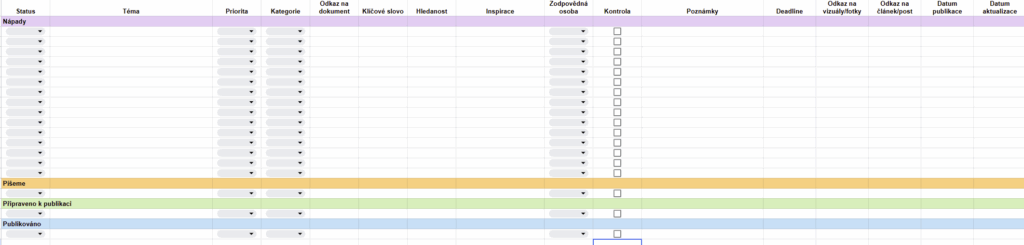
The screenshot shows fields for topic and priority, the responsible person, checks, links, and deadlines. It thus connects planned content with responsibility and work progress. No populated private rows are visible. The live public spreadsheet has a different layout and statuses; these are not identical versions.
If you use the template to create your own working overview, add a separate approval deadline, distribution tasks, and review. Also distinguish the author’s role from the person who decides on publication. These steps are recommended additions to the process, not claims about automatic features of the linked file.
The work does not end at publication
The calendar should receive a link to the page actually published and an evaluation plan. Check that the correct version was deployed, links work, images have suitable ALT text, and the mobile display does not hinder reading. For technically or commercially changeable topics, schedule checks according to their useful life.
At regular meetings, focus mainly on blocked work, capacity, and priority changes. You do not need to read every row aloud. When evaluating, connect content to its original purpose: new relevant visits, qualified inquiries, or a completed customer task mean something different from the number of articles published alone.
The calendar should make work clearer for the team, not add a second job. If tasks keep coming back without source material or nobody knows what takes priority, return to content strategy. A more precise spreadsheet will not solve an unclear brief on its own.