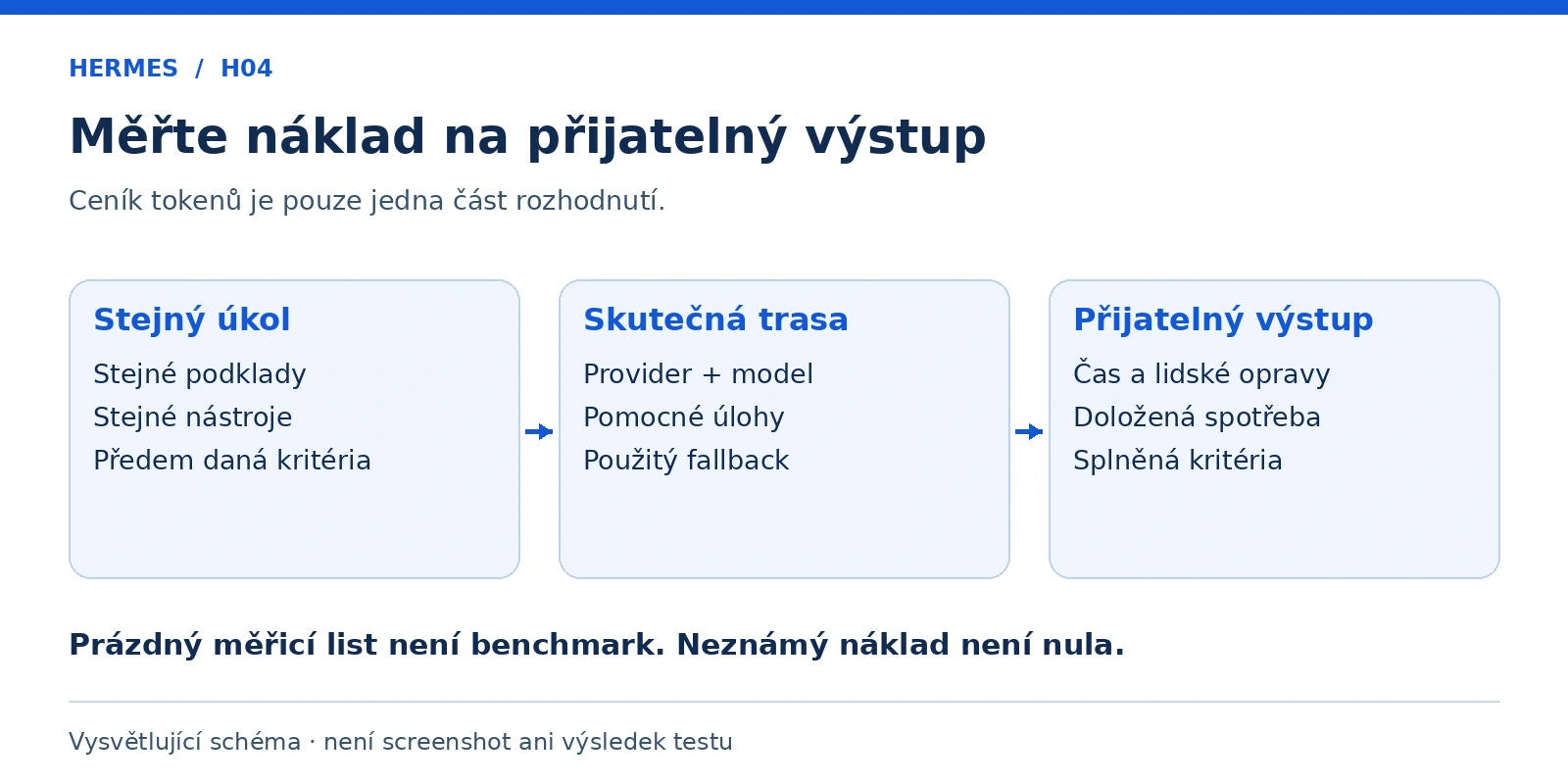

Choose a model in Hermes Agent by the task it completes, not the lowest price per million tokens. A cheaper answer may need more attempts, a more expensive model may not help with a misconfigured tool, and auxiliary tasks outside the main chat may account for some usage. First establish which service and model are actually doing the work.
The procedure below separates the provider, the current conversation’s model, the profile default and auxiliary models. At the end, you will get a blank measurement sheet for an identical test task, not a universal ranking or a table of assumed savings.
Scope of verification: this guide is based on official documentation retrieved on November 19, 2026. The latest stable release in the retrieved GitHub API was v0.23.2, dated November 16. Live docs may describe newer behavior than your package, so record the client and backend versions too. Preparing this article involved no provider login, model change, local inference installation or original benchmark. The measurement sheet is a template to complete, not a test result.



A provider is not a model, and authentication is not a price list
A provider is the supplier or service route through which Hermes calls the model. The model is the specific system answering. The same model family may be available directly from its developer, through an aggregator or through a local server. Different routes can have different authentication, model availability, limits, data handling and billing. Recording only the model’s commercial name is therefore not enough for a measurement.
The official provider overview distinguishes, for example, OpenAI Codex through ChatGPT login and OpenRouter with an API key or supported OAuth login. OAuth is an authorization method, not a synonym for free or unlimited operation. An API key alone does not tell you whether you pay per token, use credits or face another contractual restriction either.
For a specific account, check in advance what the plan actually includes, whether it supports your chosen usage route and where to find usage or billing. A model available on the service’s website may not be available through a particular interface on the same account. Check the plan and approval for processing company data with the provider, not by whether an entry appears in Hermes’ menu. This article gives no prices: without the exact current route and account terms, that would be a misleading comparison.
Before choosing, write down three task requirements: the output you need, the tools the model must use reliably and the data allowed to leave through that route. For public-document research, a missing source poses a different problem from an unauthorized data transfer in an internal analysis. A model catalog will not make that decision for you.
Check the current session and profile default separately
First check the model and provider in the open conversation. The documentation recommends /model without arguments or /status. Do not rely solely on the configured default: an already-running session may use a different model. When answers deteriorate, this is a more practical first check than rewriting the prompt again.
To change the default, the CLI offers the interactive hermes model command. In Desktop, current documentation describes Settings → Model → Main model, selecting the provider and model, and confirming with Apply. This deliberately sets the profile default; it does not establish that an already-open chat has switched. The dashboard’s main-model selection likewise applies to new sessions.
Use /model to switch within an ongoing conversation. According to current docs, an ordinary switch is session-only by default unless model.persist_switch_by_default specifies otherwise. The --global variant also saves the change, while --once applies it to the next turn only. Do not confuse “it worked in this chat” with “this is how the next task will start.”
Desktop’s composer selection has its own behavior too: the documentation describes an interface choice remembered across new chats that normally does not itself overwrite the profile default. It also notes an exception for the first selection on a profile that has not yet been configured, and the effect of the switch-persistence rule. For a controlled trial, always record the route actually selected in a new session, not just where you clicked earlier.
- Record the version, profile, current model and provider. Keep secrets out of the record.
- Decide whether you are changing only this trial or the default behavior of later tasks. Choose the appropriate control, not both options indiscriminately.
- Before measuring, open a clean test session and verify the active route again.
- If an automatic switch occurs, record the fallback route actually used. No longer attribute the result solely to the model originally selected.
Switching midway through a long conversation may lose usable prompt caching and require the extensive input to be processed again. The impact depends on the provider and its specific billing; it is not a basis for a universal savings percentage. To compare two models, prepare an identical fresh assignment rather than repeatedly switching the same growing history.
Vision, review and other auxiliary tasks may have their own model
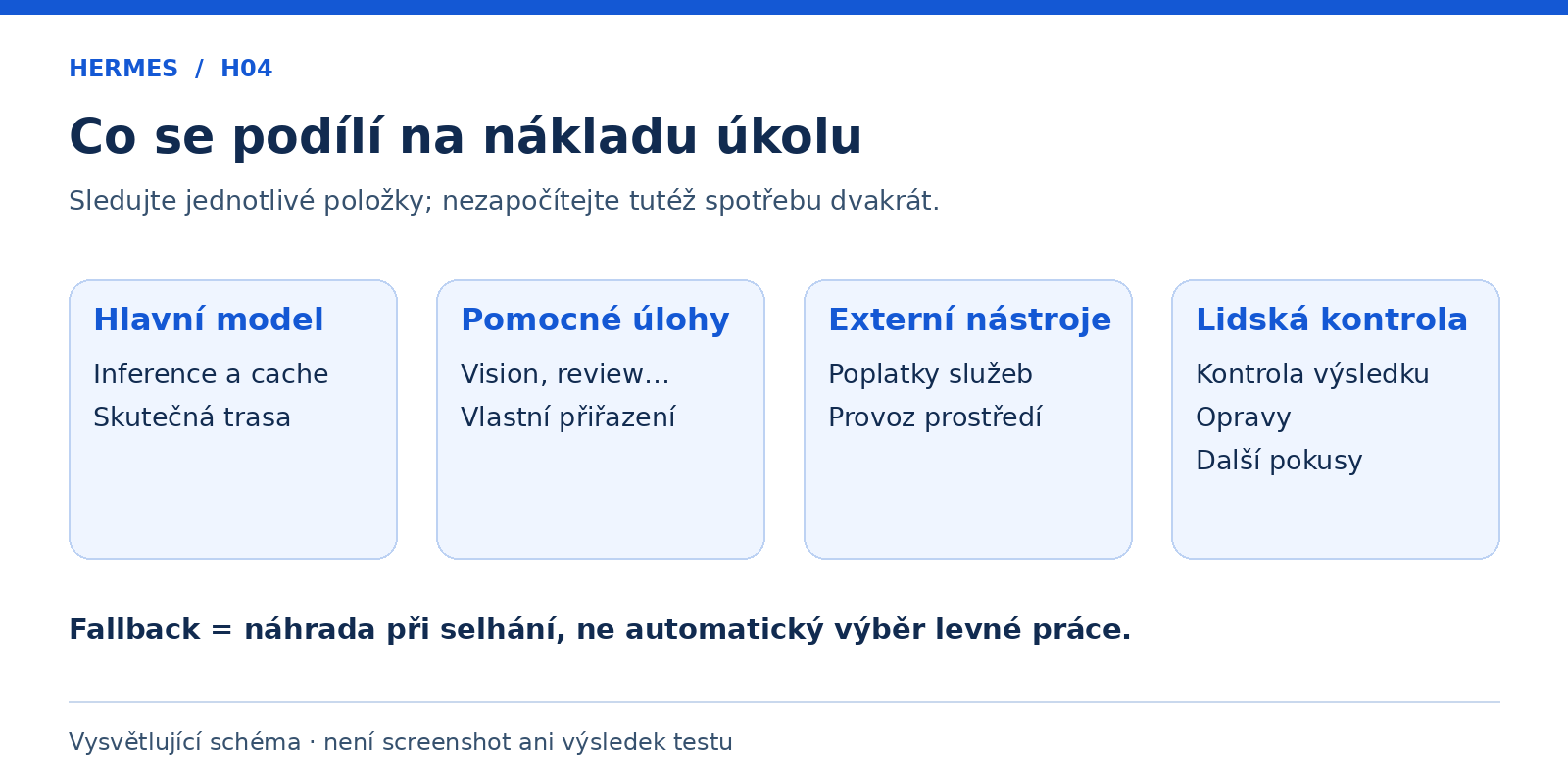
The main model handles the conversation and tool loop. Auxiliary models may handle image recognition, history compression, title generation, command-risk assessment or checks through /review, for example. A delegated agent is another separate route with its own settings; verifying the main chat does not establish that agent’s authentication, model or price.
In the current model documentation, auto for an auxiliary task means trying the main model first. If it is unavailable or encounters a capacity failure, configured fallback routes apply. With a selected main provider and no declared fallback, the docs explicitly describe skipping the task with a warning, not arbitrarily using another logged-in account. The auto label therefore means neither “always the same model” nor “Hermes will choose any cheap account.”
The source also contains a general troubleshooting example with a different description of the fallback provider. For the specific rule here, I rely on the explicit current Setting auxiliary models section and the Fallback Providers page. If there is a discrepancy in a real installation, check its version and the log for the specific task; claiming that the route is always known from the main chat would be dishonest.
Look for auxiliary-model settings in the relevant part of Model Settings; the hermes model CLI picker also offers Configure auxiliary models. In Desktop, the documentation separates Subagents settings. A cheaper title-generation model may make sense, but that does not mean the same model should review content or assess a risky command. Define the required capability and permitted route separately for each role.
Fallback handles failure, not task allocation by difficulty
A fallback is an alternative provider and model for when the main route fails. The documentation gives examples such as capacity problems, authentication errors or connection outages. It is not an instruction to “send easy questions to a cheaper model and difficult ones to a more expensive one.” That kind of work allocation is a different decision and needs its own rules.
Likewise, rotating credentials with the same provider is not the same as moving to another provider. For a fallback chain, check the order, both provider and model identities, the account, data terms and price. An expensive or data-incompatible backup is not good insurance merely because it can answer. The documentation now uses the fallback_providers list; it describes the older fallback_model as a supported historical format.
A useful detail from the fallback documentation: hermes fallback check without --live performs no inference, but evaluating authentication may refresh and save an expired OAuth token. It is therefore not unconditionally free of write effects. With --live, it sends test requests. Neither variant was run for this article; define authorization and potential usage before your own test.
If you only need to choose your first model, do not add a fallback chain yet. It is clearer to know one permitted route and know that a failure remains a failure than to get an apparent success from an account your measurement did not include.
Assess a local model by its actual context and tool use
Local inference is an optional branch, not a mandatory part of basic setup. The current Local Models documentation describes a managed runtime using llama.cpp and hardware-based model selection. It separately allows a custom OpenAI-compatible server. Do not merge the managed option and manually managed Ollama or other endpoints into one installation procedure.
Base your decision on the effective context window — the capacity actually configured for the running model — not just the maximum listed for the model family. The quality troubleshooting guide specifically warns that, with manually configured Ollama, the maximum from /api/show may differ from the selected num_ctx. Memory is consumed not only by model weights but also by context state and runtime buffers.
On the same small task, check whether the model correctly calls permitted tools, handles their errors and creates the required artifact. A fluent paragraph or tokens-per-second figure alone does not establish suitability for agent work. A local main model also does not automatically mean the entire process stays offline: an auxiliary task or external tool may communicate over the network. Check the whole data flow.
We do not estimate model downloads, memory consumption or speed from someone else’s laptop here. Before trying the local branch, verify available memory, storage and the permitted download scope in your own environment. Your task and its constraints matter for the cloud-versus-local decision, not a general promise of zero cost.
Measurement sheet: the same task, the same material, actual repairs
Prepare the same assignment using the same saved set of public material. For example: turn three documents into a report with traceable claims and acknowledged gaps. Define an acceptable result in advance: an existing file, correct source links, factually supported conclusions and no unauthorized operations. Do not change the evaluation according to the model you happen to be trying.
Keep tools and permissions identical. Start in a new session, identify the version and save the inputs so that you can distinguish a source change from a model difference. One run can expose a flaw or poor fit; it is not enough for a universal ranking. When repeating, record failed attempts and fallback use too.
| Item | Run A | Run B |
|---|---|---|
| Date, version, assignment and input identity | — | — |
| Provider, model, account without secrets | — | — |
| Auxiliary models, fallback, tools | — | — |
| Time to a reviewable output | — | — |
| Errors, further attempts and human repair minutes | — | — |
| Input, output and cache tokens by service | — | — |
| Documented inference: currency, amount, billing source | — | — |
| Tool fees and allocated operating costs | — | — |
| Requirements met, unauthorized operations, decision | — | — |
For a machine-readable record, you can use the following JSON. It is a blank form without credentials, not Hermes configuration. A null value means an unknown or unfilled field. Preserve units and currency; do not turn an empty field into zero.
{
  "task_id": null,
  "input_version": null,
  "hermes_version": null,
  "provider": null,
  "model": null,
  "auxiliary_routes": [],
  "fallback_used": null,
  "elapsed_seconds": null,
  "human_repair_minutes": null,
  "inference_cost": null,
  "tool_cost": null,
  "currency": null,
  "acceptance_passed": null
}
The total cost of an acceptable output includes documented inference, paid tools, allocated operating costs and review or repair time. For time, use your own hourly cost and convert minutes to hours. For token billing, keep input, output and cache categories separate according to the current price list for the exact route; do not count the same category twice. Compare an interface estimate with actual provider billing if the amount is not substantiated for that route.
A subscription is not zero cost. Separate incremental usage from the share of the flat fee you allocate to the task, and state your method. For a local option, add machine operation and administration as appropriate. A qualitative decision such as “this route did not meet the requirements” may be enough; you need not manufacture an exact price where evidence is missing.
Only after completing the sheet should you decide whether to keep the model for the entire task, use it only in an auxiliary role or not use it at all. The article on AI tools offers a broader overview. Here, demonstrated ability to complete your workflow takes priority over brand popularity.
Sources and what the comparison does not establish
The sources are Configuring Models, LLM and Model Providers, Fallback Providers, Local Models, quality troubleshooting and release v0.23.2. Documented capabilities are not proof that a model is available in your account or that measurements were performed here. After a route or account-terms change, verify the relevant part of the procedure again.
Need to choose a model for a specific business process?
We can first define the task, data constraints and conditions for an acceptable result, then build a comparable pilot from them. Tell me what the agent should complete and who reviews the output. Model selection will then be grounded in the work, not just the price list.