

MCP connects an AI application to external data and tools. It can help a marketing team prepare reports or work with content materials. On its own, however, it does not ensure sound analysis or safe automation. Before connecting Search Console, a CRM or a content management system, you need to define not just the task, but also the data, permissions and point beyond which a human must decide.
A good first project is not an agent that “runs all your marketing”. It is a bounded workflow: retrieve approved data, prepare an evidence-based proposal and hand it over for review. A task like this reveals whether the connection is useful or merely shifts manual work into correcting AI outputs.
What MCP is and how it relates to an AI agent
Model Context Protocol, or MCP, is an open protocol for connecting AI applications to external resources and functions. It describes how an application and a server exchange information about available capabilities and use them. An AI agent, by contrast, is a system that chooses its next steps and uses available tools to pursue a given goal. MCP can be one of its routes to tools, but an agent does not require it.
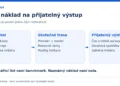



In the MCP architecture, the host is the AI application you work with. A client runs inside it to communicate with a particular MCP server. The server offers access to data or functions; it need not be a remote computer and can also be a program running on your device.
A server can expose, for example, resources, meaning data sources, prompts, reusable instruction templates, and tools, functions to execute. A tool can read a report, but it can also change a record. The label “MCP server” therefore does not tell you whether you are getting a data reader or access to modify a production system.
The important distinction is between the protocol, the particular server and the application. MCP does not determine how the model reasons about data. A server cannot automatically provide functions unsupported by the target service or for which it lacks permission. And a client need not support every capability allowed by the specification.
The current specification is not a feature list for your account
Sources were checked as of 16 November 2026. At that time, the official version overview identifies protocol 2026-07-28 as current. It distinguishes this from upcoming proposals and older, closed versions. For implementation, finding a guide labelled MCP is not enough; you need to know which version and features both ends of the connection support.
This is not a call to manually rewrite a working integration with every documentation change. It is a reason to record the supported version, connection method and tested tools. An old configuration example may not match today’s server, and a new specification may not immediately appear in your client.
One concrete implementation is MCP support in the OpenAI Responses API. The documentation describes connecting a server, choosing allowed tools and approving calls. This is developer API documentation. It is not evidence that the same server, permissions and controls are automatically available in the standard ChatGPT interface or on any subscription plan.
The July 2025 introduction of ChatGPT agent also illustrates a broader conception of an agent: working with a browser, terminal and other routes to information. It is not a current catalogue of MCP integrations. Before buying or deploying anything, always check the specific product, account availability and actual list of operations.
Where MCP can genuinely help marketing
A report based on several approved sources
A recurring report is often a good candidate because its inputs and expected output are known. An agent can retrieve data through a verified server, compare equivalent periods and prepare commentary. Its added value is not turning a table into sentences. It should highlight changes, support them with specific rows and distinguish measured developments from hypotheses about their causes.
For example, a drop in clicks across a group of pages may raise the question of whether demand, rankings or click-through rate have changed. The difference between periods alone does not explain the cause, however. The agent should suggest a further check, not automatically decide that copy must be rewritten or the budget increased.
Inputs for a content refresh
You can connect access to performance data with the current article text and an approved editorial brief. The result should be a proposal: which reader questions remain unanswered, what is outdated and which evidence is missing. If the server allows saving, a safer pilot ends in a separate draft rather than a change to the published original.
Performance data is not a substitute for content strategy. For deciding what should be created in the first place and whom the content helps, see the content strategy process. MCP makes it easier to work with source materials; it does not choose your business direction for you.
Preparing tasks rather than executing them unchecked
Another use is converting approved conclusions into proposed tasks with an owner and a verifiable outcome. If the server has write access to a project management tool, it can create the relevant items after approval. First, however, you must establish how it will recognise an existing task so that repeated runs do not create duplicates.
These are proposed workflows, not claims that every server for GA4, Search Console or a CRM can perform them out of the box. Ask to see the exact tool names, inputs, outputs and permitted accounts in advance. A marketing list of integrations is not a technical guarantee of a particular operation.
An illustrative pilot: reviewing organic performance in Search Console
Imagine a fictional B2B company that wants to review organic search performance regularly. This is not an implementation for a particular client or an example of measured results. The pilot aims to create a reviewable report from one authorised Search Console property, meaning a registered website or domain.
The brief should not say “find SEO problems”. Specify the period, search type, market, device, aggregation level and any split between branded and non-branded queries. In a seasonal sector, the immediately preceding period alone may not be an appropriate benchmark. The choice of comparison belongs in the brief, not in an unspoken model decision.
- Retrieval: allow only the approved property and read operations. Record the filters, period and retrieval time.
- Completeness check: establish whether the server paginates results and whether it returns raw data, an aggregation or only a limited selection. A missing row does not automatically mean zero performance.
- Calculation: calculate changes from saved data and retain the inputs. Calculate overall click-through rate from total clicks and impressions, not as a simple average of individual row percentages.
- Interpretation: state which data supports each conclusion and what cannot be established from it. Separate a proposed further check from a confirmed diagnosis.
- Handover: save the report for review. Do not use it to change content or website settings without further approval.
The Search Analytics API documentation allows up to 25,000 rows per request through the rowLimit parameter; the default is 1,000. It also describes pagination using startRow. It explicitly warns that internal limits may prevent it from returning every data row. A local database can simplify repeated queries and reduce the amount of data passed to the model, but it cannot recover what the source API did not provide.
Richard Baxter’s guide to connecting Search Console with Claude, whose current version uses SEO Audit Console and a local database, offers practical inspiration. It is a guide to a specific community tool, not an official Google server. Its experiences and results cannot be presented as your own or as universal MCP performance. Before installation, check the current repository, permissions and data handling.
Restrict permissions in the system, not just in the prompt
“Do not change anything” is an important instruction, but it does not replace a technical restriction. If you do not need writes, do not give the integration write permission. If you need only one property or project, do not open up the whole account. Select only essential tools and separate reading source materials from subsequently making changes.
The MCP authorisation specification describes access tokens and permissions for HTTP connections. However, it addresses a different boundary from the server’s permissions to a downstream service. Application access to an MCP server does not automatically mean that the account the server uses to read a CRM or change a website is properly restricted too.
The distinction between a local and a remote server matters operationally. A local program may have access to files and the user’s permissions on your computer. A remote server adds another operator to whom you pass requests or data. Running locally does not, on its own, guarantee that data stays on the device: a remote model, external API or another connected service may receive it.
Before launch, you need to know who owns the integration, where credentials are stored, which data sources are allowed, what logs contain and how access can be revoked. Tokens do not belong in model prompts, shared documents or public repositories. An operational log should make an operation traceable without becoming a second uncontrolled copy of client data.
Why read-only access does not address every risk
An agent can encounter third-party content that masquerades as instructions. This is prompt injection: for example, text on a web page asks the model to ignore its assignment and send retrieved data elsewhere. To an ordinary reader, it is page content; to a poorly protected agent, it may become a trigger for further action.
A read tool limits changes in the source system, but not necessarily leakage of the information read. OpenAI documentation gives an example in which a model could put a retrieved customer email address into a URL and pass it to a third party by loading that URL. This makes it important to control which other network tools the agent can use and what data it can send through them.
For sensitive tasks, it is advisable to separate public research from work with internal materials. Pass only the necessary verified research findings into the CRM step, without simultaneously giving it unrestricted scope to send data to arbitrary websites. MCP security recommendations also highlight risks from local servers, overly broad permissions and incorrect token handling. Protocol support alone is not a security certification.
For a sensitive write, the approver must see the specific target, inputs and impact of the operation. “I approve work on the website” is not the same as “I approve replacing the content of this published article”. After execution, the actual target state must be read back. An agent’s success message is not a readback from the content management system.
When conventional automation is the better choice
If a task always has the same input, fixed rules and a predictable output, a normal script or automation workflow may be clearer. There is no need to have a model reconsider the sequence of precisely defined steps on every run.
An agent is useful where context must be assessed and the next course of action chosen. That also increases the need for checking: it may pursue the same goal by a different route or use different materials. Usefulness is determined not by the number of connected servers, but by a correctly completed task and reasonable verification costs.
In the pilot, compare the current process with the proposed MCP-based workflow. Track preparation and review time, factual errors, traceability of conclusions, call costs and maintenance. Record unauthorised operation attempts and the state after any approved write separately. Measure the baseline first; savings cannot be inferred merely from connecting the protocol.
The first step: one useful task and a clear boundary
Choose a recurring task whose correctness you can verify. Write down the required output, permitted data and prohibited operations. Only then choose the server and client. Once you have verified reading, calculations and result review, you can assess separately whether you need to add writes at all.
Before handing the workflow to someone else, check that it can run without its creator. Store the workflow, model and connector versions, a description of the permitted input and the expected output outside the chat itself. Record the reason for each change to the instructions. The following is a proposed acceptance check, not the result of a test performed here:
- A known case without the creator: a backup operator follows the saved procedure with an approved test input and traces the conclusions to their sources. Assess correctness and output boundaries, not identical wording in the commentary.
- An unavailable required source: use a safe test copy to create a case where an input is missing or the connector lacks access. Do not disconnect a live workflow for the test. The output should state what could not be retrieved; unavailability must not become zero or be replaced with invented figures.
- A stop before delivery: verify that an incomplete report stays labelled as incomplete and is not sent to its recipient as finished work. The check must be part of the handover or delivery step, not just a sentence in the model’s instructions.
- Responsibility when something breaks: name the workflow owner, their backup and the person responsible for fixing the connector. The backup operator must know when to stop and whom to give an error record that contains no credentials.
Repeat the acceptance check after changing the instructions, model or connector. Include checking and maintenance costs in the decision about whether to automate the workflow. Sitebulb’s guide to operating AI skills also discusses ownership, saved versions and ongoing verification; the checks above are recommendations for this workflow, not a universal safety certification.
For the content side of such a pilot, see the article on using AI content on a website. If you want to choose a suitable marketing process and define the boundaries of its automation, get in touch. We will start with a specific task and a way to check it, not a requirement to connect every company account at once.