
Profiles in Hermes Agent separate the long-term settings and memory of individual roles. Bot Mode makes them available as named assistants in Desktop. If you alternate between content research and fact-checking, you can give each role its own instructions and history. A new name alone, however, does not separate file access or guarantee an independent login.
A research-led guide based on official documentation checked on 19 November 2026. The roles and assignments are fictional examples. No profiles were created, no bots were started and no model queries were made for this article. The expected behaviour below comes from the documentation, not a new operational test.
What belongs to a profile and what Desktop shares
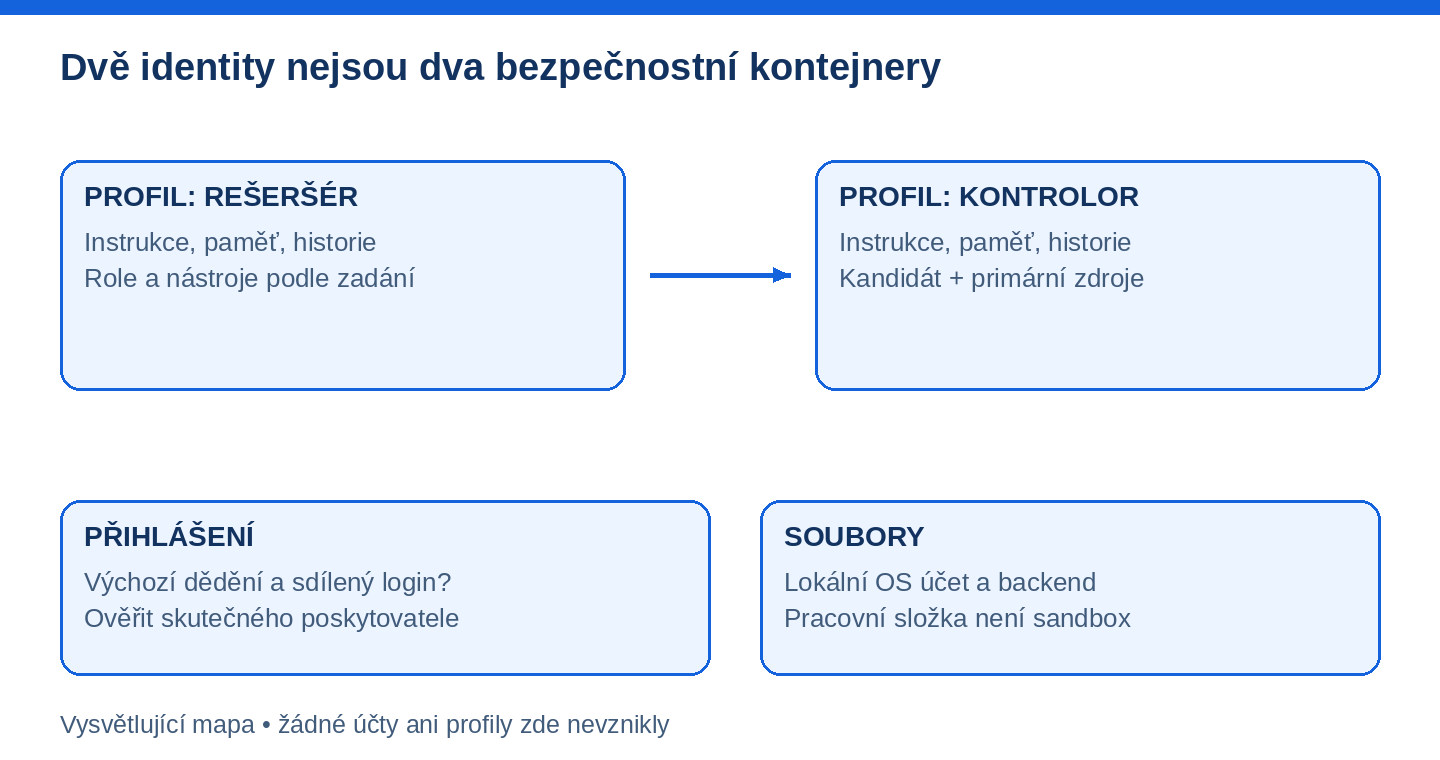
A profile is a persistent home for an assistant’s settings: it has its own configuration, instructions in SOUL.md, memory, sessions, skills and state database. A session is one conversation within that identity. If you only need two separate topics without different long-term rules, start with two sessions. A profile adds value when the distinction recurs: a researcher may prepare source material, while a reviewer should consistently look for missing evidence.
Further reading

An agent is a running assistant that uses the profile. A bot in Bot Mode is that same profile with a presence in the bot list and a canonical Bot Chat. It is not another type of security container. Nor is it a Telegram bot account: that belongs to the messaging platform and connects to Hermes through the gateway. The profiles guide explicitly explains these distinctions.
Desktop is a shared control surface. You can have several roles in the list, each retaining its own profile. With remote connections, also keep track of the machine on which the profile lives. “Create on” selects the target backend; an open window on your laptop does not itself mean the work runs on your laptop. Roles with the same name on two machines are not one identity.
Two roles working from the same public brief
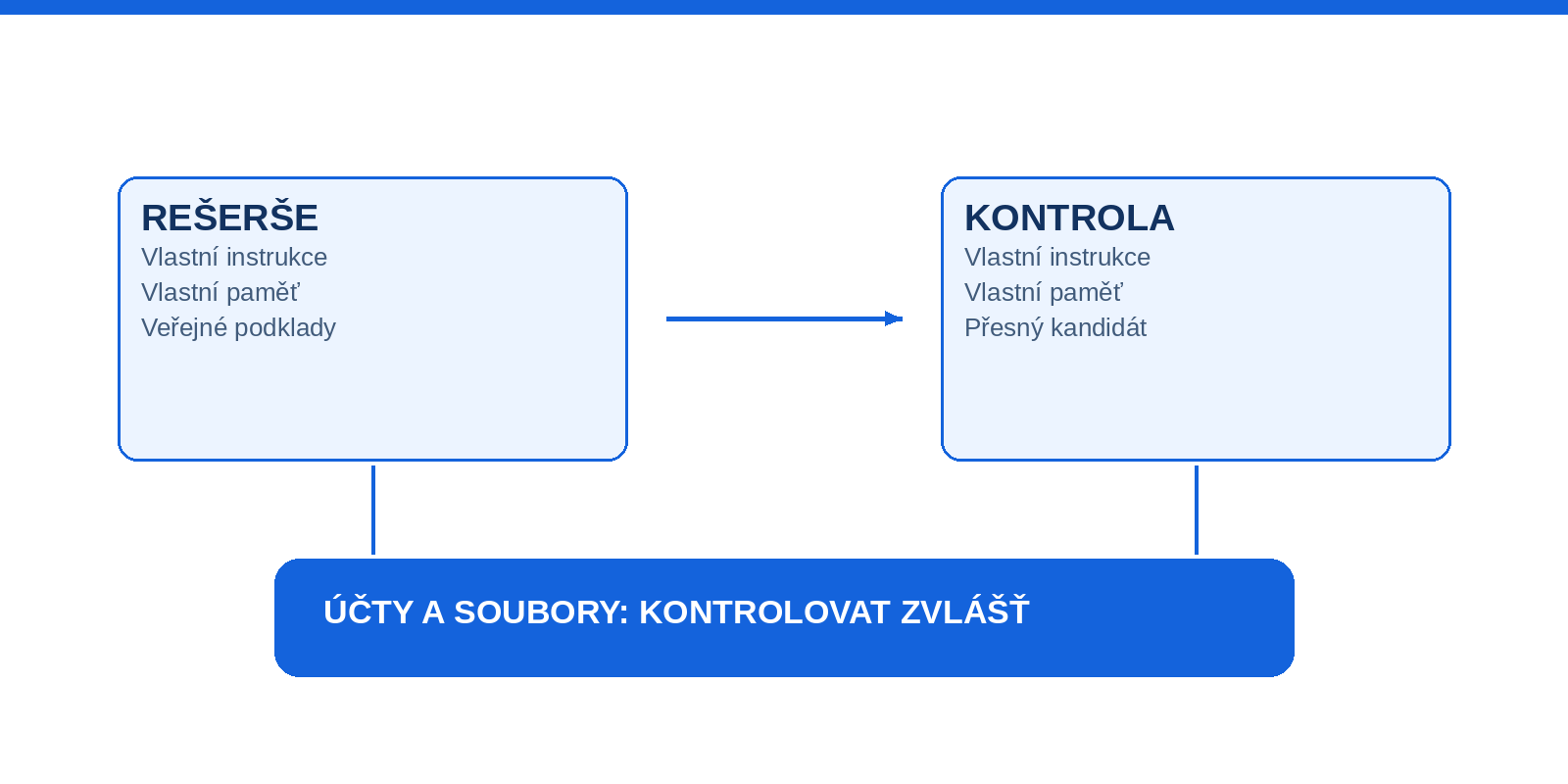
Imagine preparing a short summary of public rules for AI tools at a company. The researcher may read approved public sources, record their dates and exact passages, and prepare source material. The reviewer receives the same brief, sources and candidate text, checks the scope of the claims and returns specific discrepancies. Neither role is permitted to publish or access client accounts.
This is more than giving them different personalities in SOUL.md. For each role, define permitted tools, required MCP servers, an input folder and an output location. Describing someone as a “critical reviewer” without giving them access to sources produces opinions rather than verification. Two roles need not mean two different models, either; separate instructions and actually reading the material matter more. Output from a second AI is not a review by a real person.
The documented Desktop procedure starts in Bots with New Agent. Enter a name, title and description; in the advanced options, check the model, SOUL.md and enabled skills, toolsets and MCP. Creating a profile changes state. Do not do it merely to explore the dialog if you administer someone else’s environment or a production system.
For readers with their own test environment and approval to administer it, the documentation also provides the following shell alternative. This is a documented example, not commands run while preparing this article:
hermes profile create reserse --no-credentials
hermes profile create kontrola --no-credentials
hermes profile show reserse
hermes profile show kontrola
According to the documentation, --no-credentials does not copy keys, logins or the model. The expected intermediate result is therefore profiles without model access set up, not two working assistants. Their private access configuration is a separate task for the administrator. Displaying profile information does not prove that a role cannot read other files.
A new profile may not have new credentials
This is where it pays to slow down. According to the current guide, creating a “blank” profile by default inherits API keys and the model from the current profile, but leaves out messaging bot tokens and allowlists. At the same time, it may share the default profile’s login. Do not read “blank” as “without accounts”. In Bot Mode, copying API keys from the main profile is enabled by default.
Single-use OAuth refresh tokens introduce another limitation. The profiles guide explains that some logins cannot safely be copied into a second independent identity; a new profile may continue reading the root login. Even --isolated-auth is therefore not a universal promise of independence across all providers. For a separate account, you must check the specific provider and the actual source of authentication.
The Bot Mode page gives a simplified explanation of a bot’s own credential store during creation. When deciding how to separate accounts, follow the detailed inheritance and sharing section in the profiles guide, not just the name of a switch in a dialog. Do not judge account independence by an avatar or by having two rows in the list.
A bot as a communication surface: hand over the brief, not just a mention
Bot Mode adds a persistent Bot Chat, groups and bot-to-bot handoffs. Clicking a bot opens its canonical conversation. Be careful about expectations: in that particular conversation, the documentation describes redirecting /new and /reset to context compaction, rather than creating a new ordinary session. For ordinary sessions on the same profile, a new thread remains a separate option.
In a fictional group, you might address the reviewer: “@kontrola check only the claims about access. Return the claim, the exact source passage and a recommended correction. Do not publish anything.” Use the mention menu and check the role and machine. In an ordinary chat, the active bot may turn your mention into its own message to a colleague; the documentation explicitly warns that your text may not be forwarded verbatim. Important conditions must therefore be part of a verified handoff, not just your original sentence.
A message marked queued does not mean the colleague has completed the task. Wait for a result or an error report and read the actual output. If delivery is uncertain, do not blindly resend the same assignment: if it includes a write to an external system, you could trigger a duplicate action. Also allow for “the source cannot be verified”; silence from the other bot is not approval.
How a group operates also depends on its owner. The current documentation distinguishes gateway-managed groups, which can continue after Desktop closes, from older “classic” groups that depend on Desktop. Direct messages between connected machines routed through Desktop need the intermediary to remain running; a registered peer is a different route. The existence of Bot Mode alone therefore does not justify concluding, “I can close my laptop and everything will keep running.”
A profile is not a sandbox, and two conversations are not a workflow
On the local terminal backend, the profiles guide says the agent can access files as your operating-system user. The working directory says where tools start, not where they are allowed to go. “Do not leave this folder” is an instruction to the model, not an operating-system-enforced permission.
A host installation also retains the ordinary user HOME for external CLIs by default. Profiles may therefore find the same GitHub CLI, SSH or cloud-tool login. Choosing a separate tools home directory changes their configuration, but does not itself replace OS permissions or a properly restricted container. For sensitive work, check the full chain: profile → tool → backend → system account → specific data.
If you are coordinating the work manually and it concerns one decision, two sessions or two roles will usually suffice. Once a review must automatically wait for completed source material, you need persistent records of dependencies, status and returned defects. That is a job for Kanban, not another avatar. Short-term subtask delegation and managing Git changes are different problems again; do not use them as substitutes for managing the whole process.
The article on MCP and AI agents in marketing also discusses broader tool-access boundaries. The practical outcome of this guide should be a map of your two roles, their inputs, accounts and outputs. Only then does it make sense to create them.
The version and environment you are checking the procedure for
The sources were checked against live official guides and stable release v0.23.2 of 16 November 2026; a newer canary is not the same as a stable package. Live documentation can move faster than your Desktop. Before use, check your own version, whether the option is available and which backend is connected. The example commands use shell syntax; they are not a test performed on Windows or macOS. The current platform support overview also distinguishes the CLI, Desktop and installation packages. CLI availability on Linux does not itself establish the availability of a Linux desktop package.
Separate roles before entrusting them with company data
Do you need to define what a researcher may do, what a reviewer may do and which accounts should remain out of reach? Tell me about your AI process. I can help you define roles, result handoffs and checkpoints so that different names translate into genuinely different ways of working.