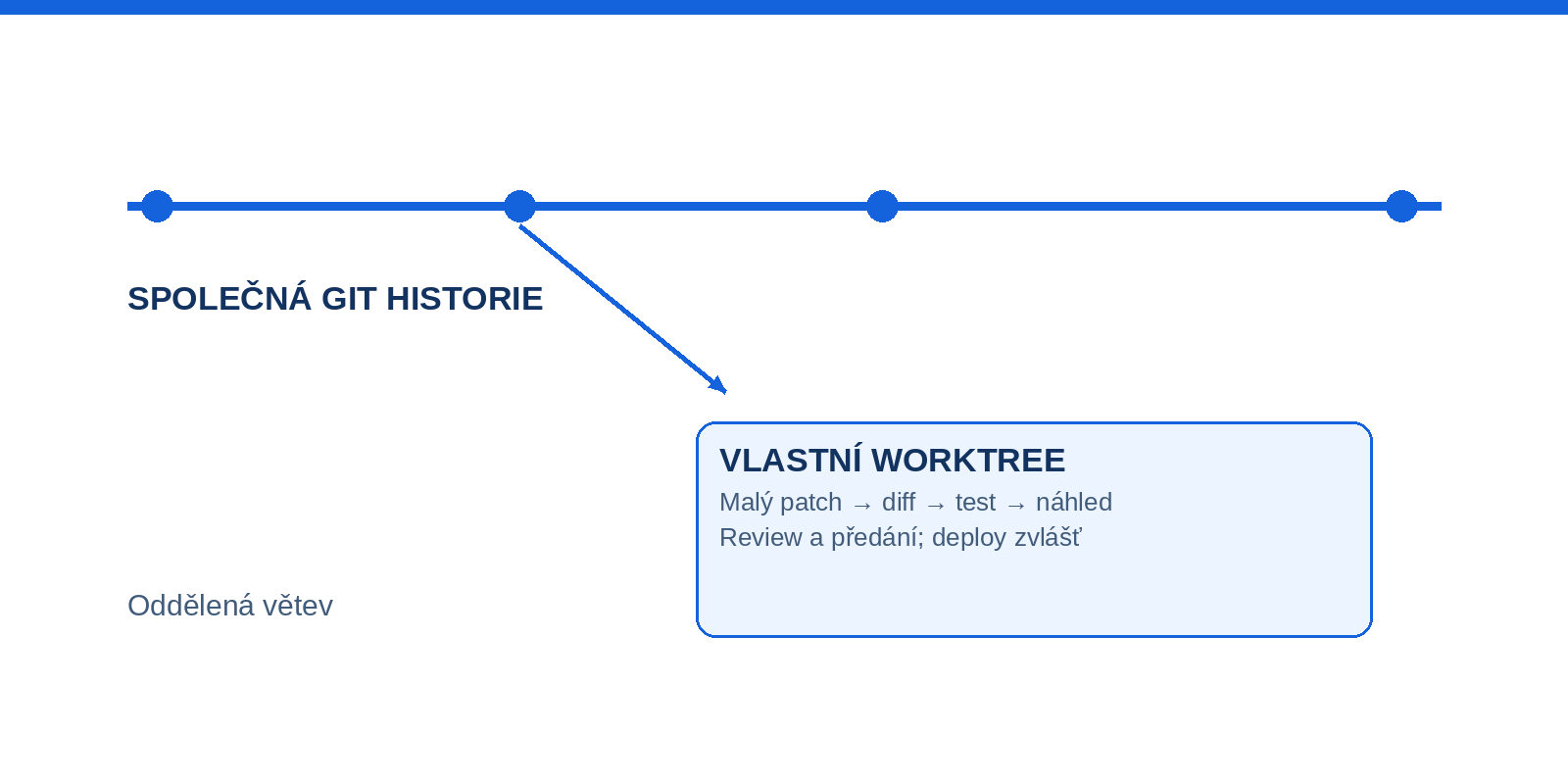

A Git worktree gives a change its own working directory and branch, so you do not have to experiment in a checkout where you are preparing other work. Hermes can edit code there, but you still need a small brief, diff review, a test and a real preview. A separate directory prevents some collisions; it neither confirms that a change is correct nor authorises deployment.
A research-led guide based on official documentation checked on 19 November 2026. The example website and patch are fictional. This is not a record of a newly performed agent edit, model inference or deployment. The synthetic HTML example and supplied test were verified separately offline; expected steps with Hermes are not presented as achieved results.
A project, branch and physical worktree are not the same thing
A project is the broader context of the work. A Git repository stores history and branches; a branch names a line of commits. A worktree is another physical checkout of the same repository with its own working copy and index. It shares a substantial part of Git storage with the main checkout. It is neither an independent clone nor a backup of the entire project.

According to the Git worktree documentation, you can have multiple working trees at the same time. You normally cannot check out the same branch in two of them simultaneously. That is why you give a small change its own branch rather than let two assistants loose in the same directory and hope they do not meet in the same file.
The Hermes guide offers an automatic hermes -w mode and the interactive command /worktree new. Desktop describes creation through New worktree or Cmd/Ctrl+Shift+B and displaying worktrees under a project. Option names may vary by client version; the aim is a verified directory and branch, not a particular button position.
A worktree is not a sandbox. If tools run under an account with production access, a new directory does not remove that access. The same applies to Hermes profiles. Before working, remove production mounts and access from the demonstration environment; a sentence in a prompt does not turn them into a security boundary.
Start with a small change and acceptance criteria
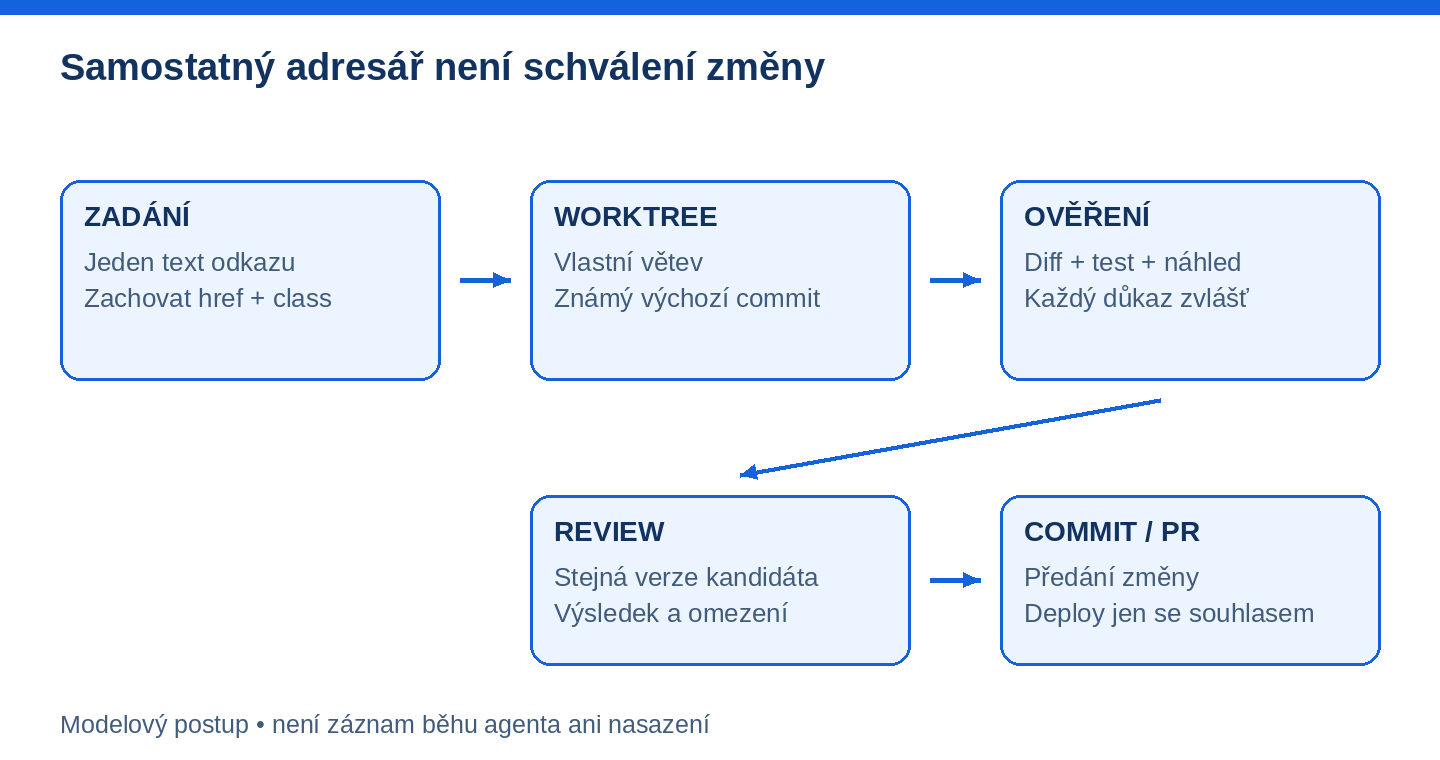
On a fictional static website, a link to the contact section is labelled “More”. The brief is to change only the link text to “Book a consultation”, retaining the #kontakt destination, existing class and all other content. No new dependencies, form behaviour or deployment changes. This is a scope that can reasonably be read and reviewed.
Acceptance has three layers. In the source, only one text node changes. An automated test checks specific relationships and element counts. A person checks clarity, focus, wrapping and whether the link leads to the relevant section in a real preview. None of these forms of evidence replaces the other two.
The following documented procedure assumes a trusted Git repository you own, a clean, known starting state, Git installed and an approved environment for working with Hermes. The example paths are not your production environment. The commands here were checked syntactically; creating a worktree and running Hermes were not performed for the article.
# Run from the root of your own fictional repository.
git status --short
git worktree add -b feature/kontakt-popisek ../web-kontakt HEAD
cd ../web-kontakt
git status --short
The first listing should show whether you have unrelated changes. If it does, deliberately preserve or separate them first; do not use a destructive reset as a cleanup shortcut. Explicit -b creates a new branch and HEAD specifies the starting commit. Verify beforehand that this is the right base. A branch name is no substitute for commit identity.
An agent edit should return a patch, not rewrite the entire website
In the approved environment, open Hermes directly in the new directory or the project’s corresponding worktree in Desktop. Verify the working directory and branch before giving the task. For a remote connection, also verify the terminal host: Desktop distinguishes an SSH shell on the remote machine from a “This device” terminal, which may open for a URL or cloud connection. A selected remote chat is not proof of a remote shell.
The agent brief should specify the permitted file, exact before-and-after text, preserved attributes and a prohibition on deployment. Require it to read the surrounding HTML before editing and list the changes afterwards. If it discovers a generated file or shared component, it should stop the change and identify the actual source. Fixing the resulting HTML may not fix the application that regenerates it at the next build.
For our fictional page, the intended resulting section is below. This is a synthetic example with the class and destination preserved, not agent output:
<main>
  <a class="cta" href="#kontakt">Book a consultation</a>
  <section id="kontakt">
    <h2>Contact</h2>
    <p>Illustrative contact section without a form.</p>
  </section>
</main>
The original link text was “More”. In a small diff, you therefore expect one text replacement, not a change to the section, classes or address. Check this expectation yourself:
git diff --check
git diff --stat
git diff -- index.html
git diff --check looks for selected whitespace issues and conflict markers, not semantic correctness. --stat shows the scope, and the last command shows the actual changes in the file. Also check repository status: an ordinary diff does not show the contents of all untracked files or changes already staged in the index.
A small automated test: what it proves and what it does not
For this synthetic page, you can use Python 3 with no additional libraries. Save the following file as test_kontakt.py beside the illustrative index.html. It checks for the single intended link, its attributes and the existence of exactly one destination. It does not verify CSS, actual scrolling or form availability.
from html.parser import HTMLParser
from pathlib import Path

class ContactParser(HTMLParser):
    def __init__(self):
        super().__init__()
        self.links = []
        self.current = None
        self.targets = 0

    def handle_starttag(self, tag, attrs):
        attrs = dict(attrs)
        if attrs.get("id") == "kontakt":
            self.targets += 1
        if tag == "a":
            self.current = [attrs, ""]

    def handle_data(self, data):
        if self.current is not None:
            self.current[1] += data

    def handle_endtag(self, tag):
        if tag == "a" and self.current is not None:
            self.links.append(self.current)
            self.current = None

page = ContactParser()
page.feed(Path("index.html").read_text(encoding="utf-8"))
contact = [item for item in page.links if item[0].get("href") == "#kontakt"]
assert len(contact) == 1, "Expected exactly one contact link"
attrs, label = contact[0]
assert attrs.get("class") == "cta", "Link class changed"
assert label.strip() == "Book a consultation", "Incorrect label"
assert page.targets == 1, "Missing or duplicate destination"
print("Illustrative contact checks passed.")
Run it in the illustrative page’s directory:
python3 test_kontakt.py
During preparation of the article, this supplied test was actually run against the synthetic HTML above and passed. Negative variants with the original label, an incorrect class and a duplicate destination failed. This demonstrates only that this small example works. It does not demonstrate an agent edit, a successful framework build or a functioning website in a browser. For a real project, use its existing tests and build; do not run unreviewed scripts from someone else’s repository merely because they are called “test”.
A real preview and independent review before handoff
Start your project’s documented local preview and verify that you are viewing your own worktree, not another process on the same port. Check the page on desktop and a narrow mobile viewport, navigate to the link with the keyboard and verify its destination section. A long label can pass a test while obscuring a neighbouring element on mobile. A screenshot without verified page identity is not evidence of the right version.
The reviewer should receive the brief, base commit, candidate diff, test results and preview of the same version. They should not merely repeat the author’s “everything passed”. For this change, they should especially check that the destination and class are preserved, the scope of the intervention and the link’s readability. A defect means a fix and a new review of the affected candidate, not overwriting the original negative finding.
No project preview or independent approval of a real patch was performed here for the fictional page. These are steps for the reader to carry out in their own environment. The original diagram is therefore not a substitute for a screenshot of a successful run.
A commit and PR are a handoff, not an automatic deployment
Record only the approved change in a commit and hand it over in a pull request. State what changed, how it was verified and what remained outside testing. Also check CI for the exact latest commit; a green result for an older version does not approve a new fix. Opening a PR, merging and deploying are separate operations with their own permissions.
Watch out for repository automation: even a push or merge can trigger deployment. Before these steps, check the workflow, target branch and owner’s approval. Do not assume the label “test branch” prevents publication. For small copy changes, handing a verified patch to the website administrator is often entirely sufficient.
After finishing, remove a worktree using the supported Git procedure, not by deleting a random folder. The current Hermes guide also describes automatic cleanup and archiving of inactive managed worktrees. Ignored files, such as local environments and some outputs, are not included in these archives. A worktree or its automatic archive is therefore no substitute for a backup or durable handoff of evidence.
Version and scope of the guide
The sources were compared with the v0.23.2 release of 16 November 2026 and newer canary notes. Specific current behaviour of worktree options comes from the live guide, not an assumption that every option exists in all older packages. Shell examples are for Bash on Linux or a similar environment with Git; for Windows, adapt the shell and available Python command. The supplied test was verified offline in the recorded editorial environment, not on every OS. Desktop packages have their own platform support limitations.
Define a safe, small change for your website
Want to use AI for website edits but lack a clear brief and checks before handing work to a developer? Tell me what change you are working on. I can help you separate proposal, verification and approval from deployment itself, so automation does not start with production access.