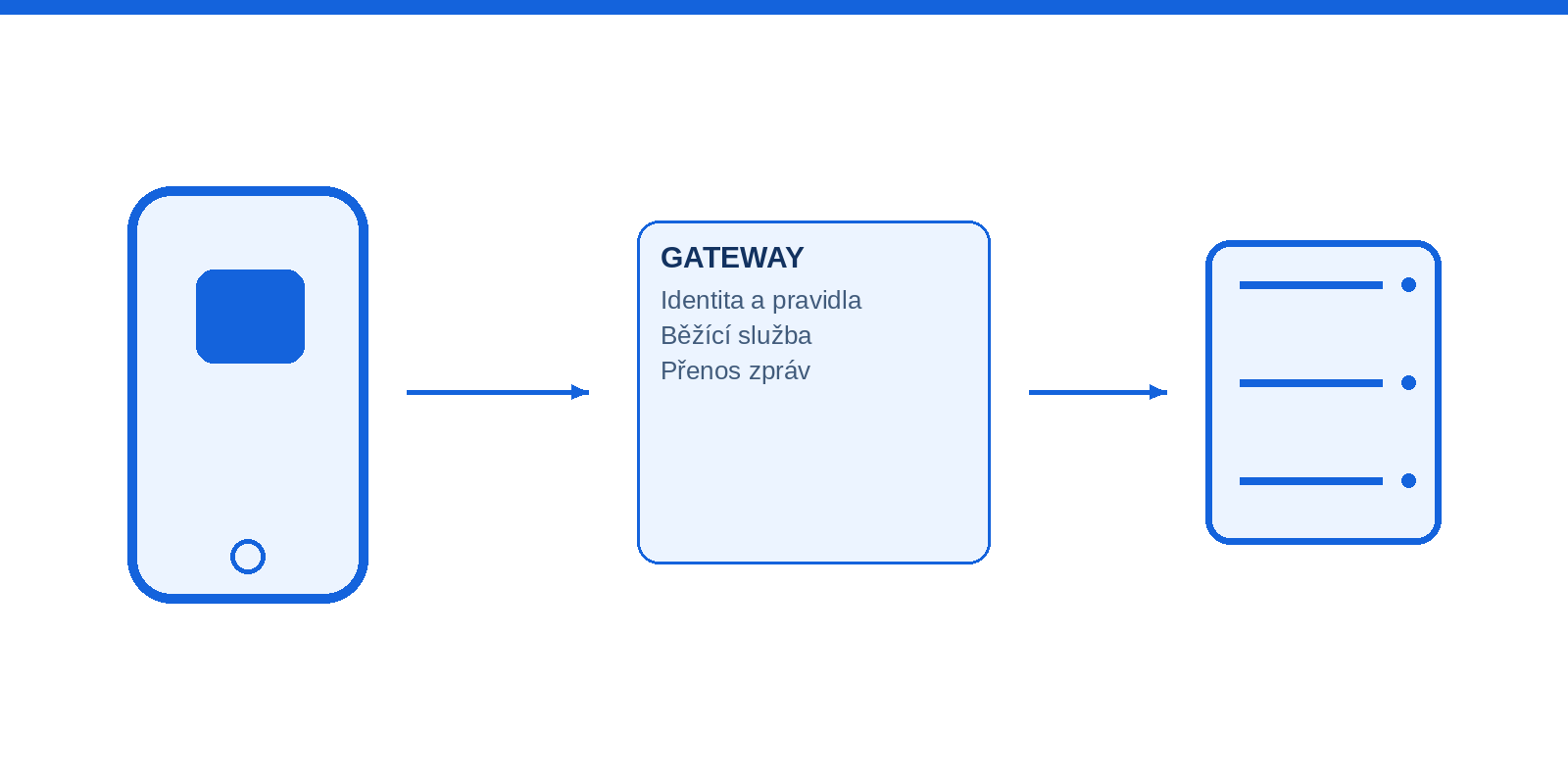

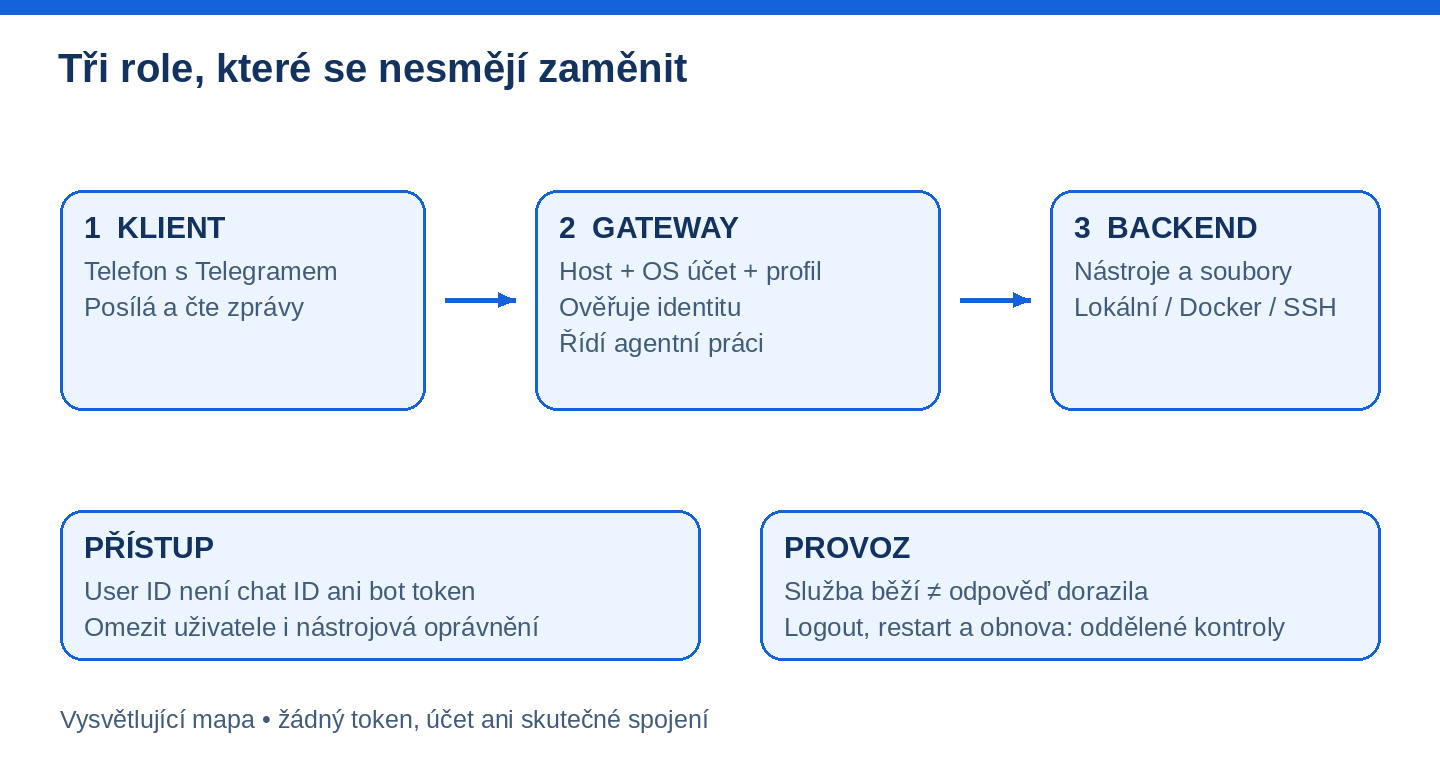
You can control Hermes from your phone through Telegram if its gateway is running on a computer or server. The phone is the client. The gateway receives messages and coordinates agent work; terminal tools may run somewhere else again. Confuse these three roles and it is easy to configure the right thing on the wrong machine.
This guide assumes you already have a working installation and model access. We will not revisit the installer or buying a server. We will cover one Telegram adapter, user restrictions, running a service and checks after a restart. A VPS is an option for avoiding dependence on an always-on personal computer, not a prerequisite for phone access.
Scope of this guide: a research-led procedure based on official documentation checked on 19 November 2026. The stable release at the time was v0.23.2 of 16 November; live docs may be ahead. The main operational path is Linux with systemd. I cover macOS and Windows differences separately. No bot, token, service or configuration was created or changed for this article; the check results described are expected, not achieved.


First identify the client, gateway host and tool execution location
Telegram runs on your phone. The Hermes gateway runs on a host you administer, with a specific profile, permissions and model configuration. The third layer is the terminal backend: a tool may execute commands locally on the gateway host, in a container or over SSH on another machine. Connecting to a server through Telegram does not itself configure an SSH backend or grant access to every file on the server.
Decide in advance where the gateway should run, under which OS user and profile; where its data lives; and where tools actually read and write. If Hermes runs on your home computer and you turn it off, your phone will not take over. If the gateway runs on a server, turning off your laptop may not matter, but the server still needs a network, an available provider and a working integration. “It’s in the cloud” answers none of these checks.
Attachments show one practical consequence. The official Telegram guide warns that files are sent by the gateway process, not the terminal inside Docker. A path that exists only inside a container is therefore not automatically available to the sender on the host. Use an approved shared output directory and compare both paths; do not solve the error by mounting your entire home directory with its credentials.
Connect one bot and allow a specific identity
For your own self-hosted gateway, the documentation offers manual bot creation through the official BotFather and interactive Hermes configuration. Send it /newbot in Telegram, choose a name and a unique username ending in bot. The issued token is a bot credential, not text for an agent conversation. Do not put it in chat, screenshots, Git or command arguments. If it leaks, revoke it through BotFather with /revoke.
On the correct host, open a private interactive terminal and the documented wizard:
hermes gateway setup
Select Telegram and enter the token directly into the private wizard. Configure permitted users, not public access. According to the documentation, the wizard may offer to start or restart the gateway at the end; this is a real operational intervention, so check other running tasks first. It does not make forwarding the token afterwards as “setup confirmation” safe.
The TELEGRAM_ALLOWED_USERS variable contains numeric Telegram user IDs, not usernames. It is also different from a chat ID or topic ID. Obtain the number using the official Telegram guide and compare it with the account you intend to allow. Your own user and a private chat are enough for initial personal use; do not add groups, conversation observation or other bots merely because they are available.
The general messaging documentation distinguishes allowlisting from pairing. Pairing is an alternative in which an administrator confirms a specific access request; do not approve a code solely on the word of someone claiming to have sent it. An allowlist answers who can reach the bot, not the full scope of its tool permissions. Also check broader gateway rules and previously approved identities. Replacing one list alone does not prove that all old access has been removed.
Do not enable GATEWAY_ALLOW_ALL_USERS as a fix for a broken connection. If the bot can work with files or a terminal, an identity verification failure is a reason to stop access and investigate, not bypass it. The article on MCP and AI agents in marketing explains the basic distinction between a tool’s capabilities and an account’s permissions.
The current documentation also offers bot creation through a QR code in Desktop and the dashboard. With Hermes Cloud and Team Gateway, however, this may link an account to a shared bot rather than start your own direct adapter. This article follows one self-hosted path; do not mechanically apply it to managed cloud or disable its relay rules without understanding the impact.
Turn a foreground process into a managed service
The hermes gateway command starts the gateway in the foreground. It is useful for an initial check, but does not by itself promise continued operation after logging out of SSH. For a persistent run, use a supported service and choose exactly one scope. Two simultaneous gateways with the same bot token are not a backup; they can compete for Telegram polling and cause a 409 error.
On Linux with systemd, the first option is a user service. The following block is a documented procedure for an authorised host; it was not executed for this article:
hermes gateway install
hermes gateway start
hermes gateway status
journalctl --user -u hermes-gateway -f
The log view follows output continuously; ending that view does not stop the gateway. For a user service, the documentation describes lingering so the process does not depend on a logged-in session:
sudo loginctl enable-linger "$USER"
This changes a system setting for a specific user. The administrator should confirm that it is the account actually running the service. In a container without a user systemd session, simply copying the command will not solve the situation. For a headless host, the docs describe a boot-time system service as an alternative, still running under a user account:
sudo hermes gateway install --system
sudo hermes gateway start --system
sudo hermes gateway status --system
These are alternatives, not consecutive steps. The system scope requires the appropriate administrative rights for management too. If a correctly managed service already works, do not create a second one alongside it. Record its scope, user and data directory in an operations note; this makes it easier to investigate “it works in the terminal, but the service cannot see the login”.
On macOS, the reference uses launchd, not systemd. On Windows, it describes a scheduled task at login; it also explicitly warns that its restart policy monitors the launcher and does not guarantee recovery of the gateway after any later process crash. Do not transfer Linux commands or a promise of automatic recovery to Windows. WSL is a separate Linux environment with its own operating conditions.
Verify a restart with a message, not just a green status
For a planned restart, the current documentation prefers hermes gateway restart, which requests draining in-progress work and waits for the replacement process. A direct restart through the service manager follows a different timeline. Do not add your own hard-kill hooks as a universal “safeguard”; the official guide warns about restart loops caused by such interventions.
hermes gateway restart
hermes gateway status
For a system service, use the appropriate administrative scope according to your version’s help. Do not start a restart during an important write simply because the application is not responding. First establish its state, last activity and the cause. An available process does not always mean a healthy event loop; the current reference also distinguishes a stale heartbeat and a degraded state.
A post-change check should use a harmless message agreed in advance, such as “Return only the test text MOST; do not use tools”. From an allowed account, you expect a reply in the same private chat. From a second test account without permission, you expect no agent work to begin; a pairing prompt, if shown, is not permission. Do not use someone else’s account for a negative test without their consent.
Then log out of SSH and check the same harmless request again. Separately check the state after a planned service restart; restarting the entire host is another distinct test, not something the first two automatically prove. Record the time, version, service and actual result. The expected response in this guide is not evidence that your host has already passed.
The Telegram guide now describes retaining pending messages on cold boot and protection against repeated update IDs. It also lists limitations and warns about partially processed messages after a crash. After a long outage, an old delivered instruction may no longer be current. Check pending work before resuming automations; do not infer exactly-once execution of external actions from deduplication.
A Desktop connection does not automatically mean a remote terminal
If you use Hermes Desktop alongside Telegram, distinguish gateway selection from the specific shell. According to the current Desktop guide, each terminal has its own host; an SSH gateway can open a shell on the server, while URL/token and cloud connections do not provide a shell, and a new terminal may run on This device. Switching chats also does not relocate an already open terminal.
Before entering a data path or opening an editor containing credentials, read the terminal’s host and user. A private token stored on a laptop will not help a server service using a different profile; copying the entire credentials directory to every machine would be the wrong fix. Grant only the specific access needed through a secure route.
Telegram does not require exposing a public, unprotected administration port. For remote Desktop or web control, use the official authenticated route, an SSH tunnel or a trusted VPN according to your topology. A VPN protects the access path; a VPS is a virtual server. Neither replaces user verification and tool restrictions. As the documentation advises, treat Webapp access as access to the capabilities of the OS account running Hermes.
Recovery starts with a list of data and responsibilities
A persistent gateway needs an operations owner. Define who monitors availability and model usage, who may update it and who decides when automatic tasks can resume. Choose capacity according to simultaneous conversations, browsers, tools and model work, not the cheapest advertised plan. Without those measurements, this article cannot promise that a particular VPS is suitable or give a price for continuous operation.
A recovery plan should cover the profile’s actual Hermes home, configuration, required sessions and state databases, cron definitions, skills, plugin data and, separately, working files. Back up credentials encrypted and with restricted access, never to a public repository. A file list is not a verified backup, and a simple copy of a database being changed may not be a consistent snapshot. Choose a supported backup procedure for your installation and record the version and restored data scope.
Test recovery on an approved, separate target. Before connecting it to the network, prevent the same bot and automations from running alongside the original. Check that restored data can be read, the profile identity, allowlist, model availability and a harmless message; only then, if appropriate, restore scheduling. “The service started” does not prove that the correct files were restored or that extra old jobs will not run. This article did not perform such a recovery.
Sources and applicability
This procedure is based on Telegram Setup, the messaging reference and service management, the Desktop guide, security documentation, platform support and release v0.23.2. The sources were checked on 19 November 2026; this is neither a server test I performed nor a security certification.
Clarify what should remain available without your laptop
If you want to use Hermes for specific marketing work, tell me what should be available and to whom. I can help define the process and output checks; someone with the appropriate technical responsibility should take charge of host and access management. Before adding another integration, you need to know who may use it and how you will tell whether it has recovered correctly after an outage.