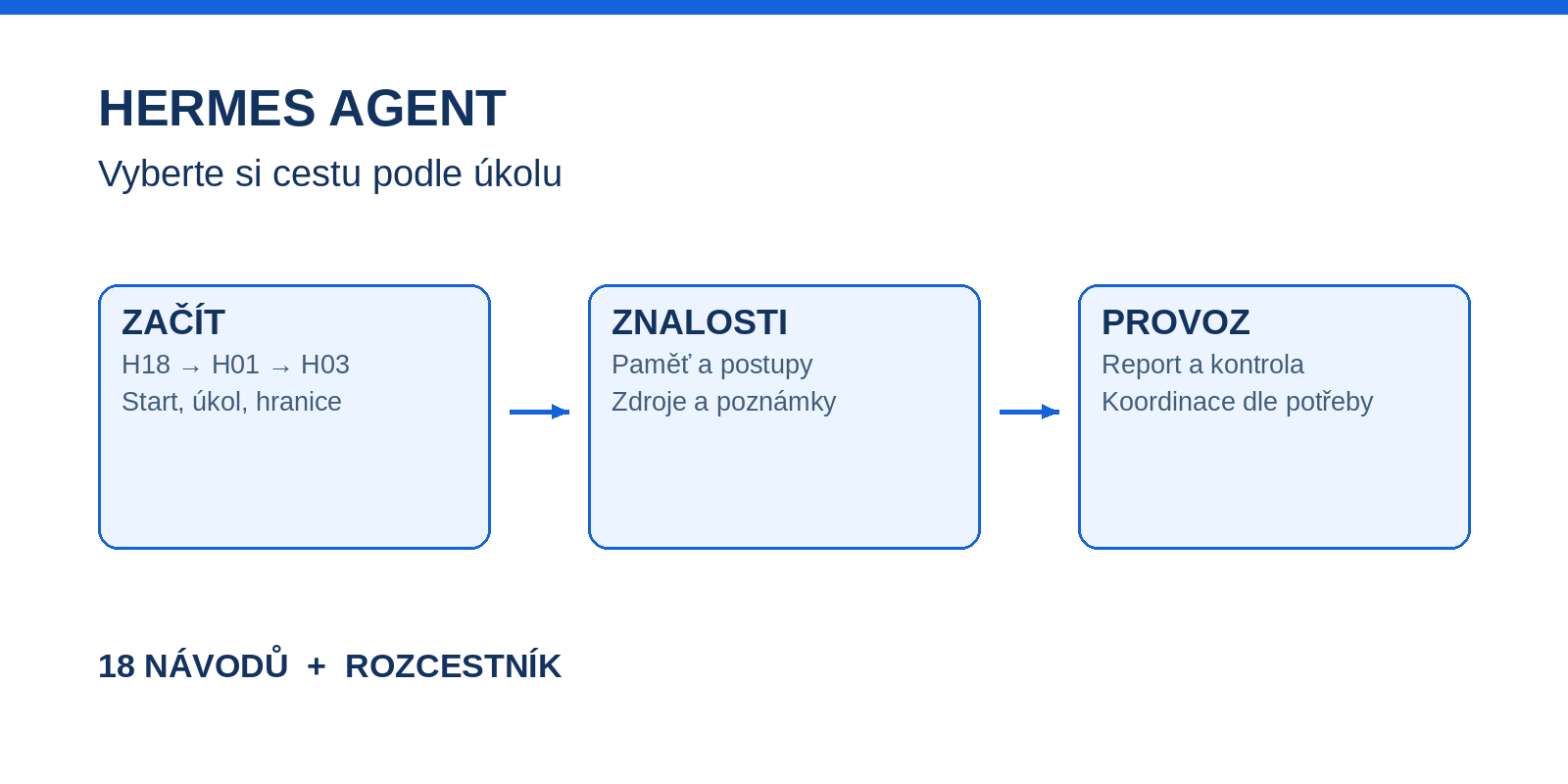

Choose the outcome you need right now. If you do not have Hermes yet, start with installation. If it can already answer and work with authorised material, skip to research, notes or a recurring report. Desktop, MCP, subagents and Kanban are not compulsory stops for every user.
The map contains 18 guides: H18 and H01–H17. Together with this hub, that makes 19 items in the series. Open individual instalments by clicking their titles below.
How to choose your route through the series
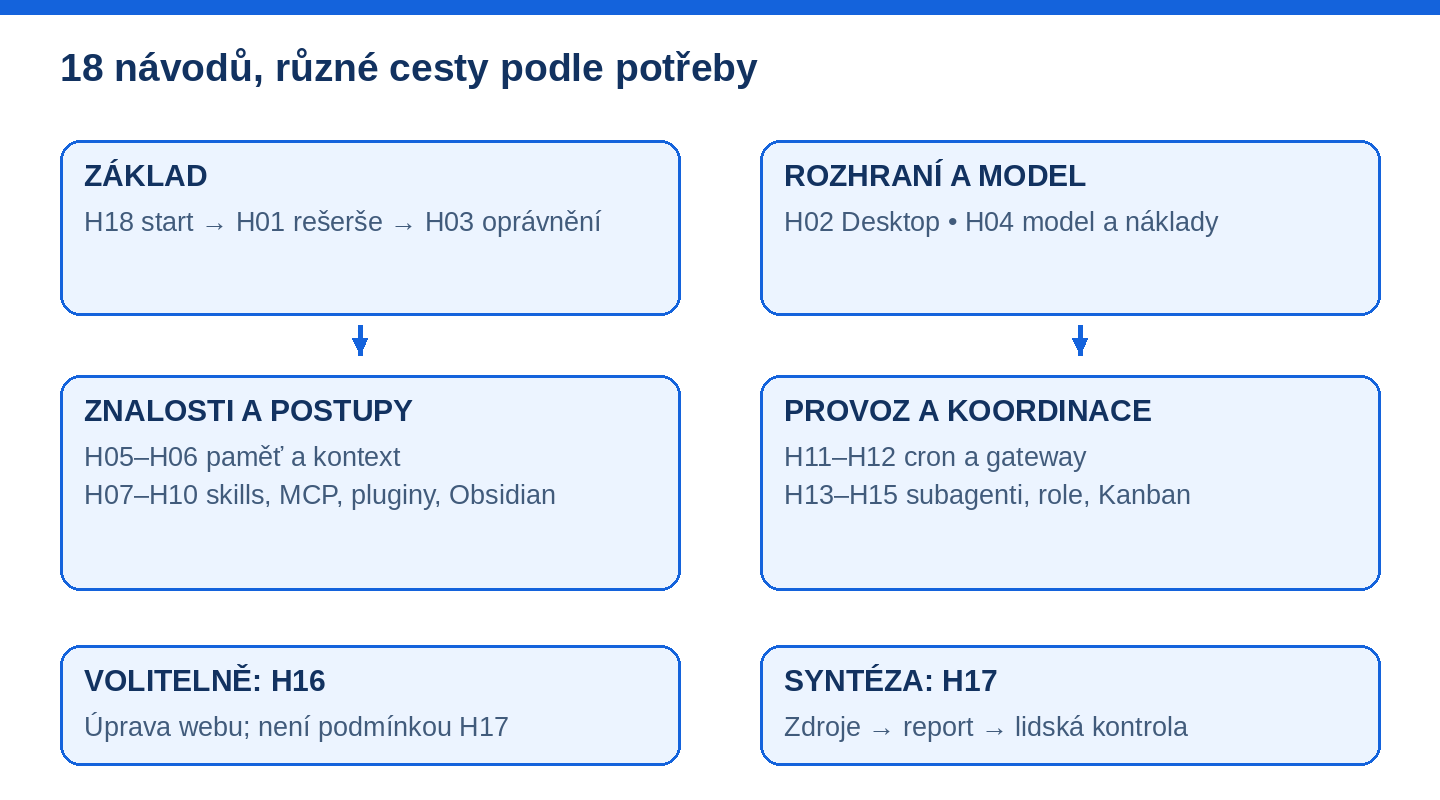
To try a research task, the H18 → H01 → H03 route is enough. For repeatable source work, continue through memory and context H05–H06 to skills H07, then, as needed, MCP H08 and notes H10. H11 adds a recurring report. The final Source Observatory project H17 brings these steps together; H15 is not a mandatory part of it.
Further reading

The guides are research-led procedures that separate expected outputs from evidenced examples. They do not promise that every step has been freshly tested on every system. The current technical authority is the official Hermes documentation; your installation always depends on the version, chosen interface, provider and actual permissions. When checked on 19 November 2026, GitHub listed v0.23.2, released on 16 November, as the latest stable release.
Do not have Hermes yet? Start with H18
H18 — How to download, install and configure Hermes Agent on a PC or VPS
Goal: Choose a supported local or server route, complete initial setup and recognise a working first conversation. Prerequisites: No previous instalment. You need an environment you own or are authorised to use and a chosen provider. Do not address a persistent gateway before the first successful start.
Check support coverage before choosing an installer. The current support matrix distinguishes, among others, macOS on Apple Silicon, native Windows and Linux/WSL2. The Windows CLI and Desktop package do not have the same requirements; MSIX requires Windows 11 22H2 or later. For Linux, desktop packaging is not enabled in the current release workflow. This support overview does not claim that other local build variants do not exist. H18 covers the specific route.
Hermes already responds: first task, interface and security
H01 — How to give Hermes Agent a research task and check a three-source report
Goal: Set one research question, define three public sources and check whether the report really uses them. Prerequisites: H18 or an equivalent working installation. Start with public materials, not a company drive.
H02 — How to use Hermes Desktop: conversations, files and remote connections
Goal: Find your way around Desktop conversations, files and remote connections. The point is to know which machine the work actually happens on. Prerequisites: H01 and a supported Desktop route. A graphical window alone is not a new security boundary.
H03 — How to configure permissions and safe access to files and accounts in Hermes Agent
Goal: Define permitted files, accounts and changes. Understand the difference between an available tool, its permissions and approval for a specific intervention. Prerequisites: H01 and clearly separated working data. Return here before connecting more accounts.
Model, memory and context: H04–H06
H04 — How to choose a model in Hermes Agent and measure its usage costs
Goal: Choose a model for the task and determine how to track actual costs, including correcting the output. This is not a ranking of a single best model. Prerequisites: H01 and H03; know the account, billing arrangements and authorised budget.
H05 — How memory works in Hermes Agent and what is retained between conversations
Goal: Distinguish persistent memory, history and a procedure saved in a skill. Choose what should survive between conversations and what is merely input for a specific task. Prerequisites: H01. Do not use sensitive data for your own trials.
H06 — How to manage context in Hermes Agent: compression, history and task handoff
Goal: Recognise when a conversation has become overloaded and prepare a concise handoff that preserves decisions, files and unresolved points. Prerequisites: H05; cross-session memory and current context are not interchangeable.
Repeatable procedures and knowledge work: H07–H10
H07 — How to create and test your own skill for Hermes Agent
Goal: Turn a repeated procedure into instructions with inputs, boundaries, an output and verification. A skill should help with the next task, not archive an entire old chat. Prerequisites: H03 and H06. First you need a clear procedure, then its reusable form.
H08 — How to connect an MCP server to Hermes Agent and limit the available tools
Goal: Assess an MCP server, the tools needed and their limits. The aim is to connect a missing capability, not the largest possible catalogue of integrations. Prerequisites: H03 and H07; for your own trials, a verified public read-only purpose and authorised access. Installing a server is a separate decision.
H09 — How to choose plugins for Hermes Agent and verify their compatibility
Goal: Verify a plugin’s provenance, compatibility and actual contribution to a specific installation. A plugin and an MCP server are not automatically the same thing. Prerequisites: H03, H07 and H08; know your installation’s version and the permitted scope of changes.
H10 — How to connect Hermes Agent with Obsidian and maintain notes with sources
Goal: Design an Obsidian note in which the evidence and limits of the conclusion can be traced. The workflow does not have to turn every file into another empty note. Prerequisites: H05–H08 and separate, non-private materials. Authorise writes to your own vault according to the task’s actual scope.
Recurring operations and coordination: H11–H15
H11 — How to schedule a recurring report in Hermes Agent using cron
Goal: Prepare a recurring-report brief, a timezone and separate checks of execution and delivery. Prerequisites: H03, H04 and H07; a working foundation and a gateway available at the scheduled time. Starting Hermes for the first time does not require cron.
H12 — How to connect Hermes Agent to Telegram and keep the gateway running on a server
Goal: Establish mobile communication through Telegram and distinguish connecting to a bot from keeping the gateway running on a server. Prerequisites: H18 or a working equivalent, H03 and H11. A server makes sense for availability without a personal PC, not as a shortcut around permissions.
H13 — How to divide work among subagents in Hermes Agent and verify their results
Goal: Divide independent subtasks and define how to verify their outputs before assembling the result. More agents do not automatically mean more evidence. Prerequisites: H03, H04 and H06; a clear brief, costs and handoffs between roles.
H14 — How to use profiles and Bot Mode in Hermes Agent for separate working roles
Goal: Separate working roles and understand what profiles and Bot Mode share or retain separately. A different profile name alone does not demonstrate an isolated account. Prerequisites: H03 and H05; H13 is recommended, not required.
H15 — How to manage tasks, dependencies and work review in Hermes Agent Kanban
Goal: Organise multi-phase work with dependencies and review of a specific output version. This is useful when a single clearly defined task is no longer enough. Prerequisites: H03, H13 and H14. Verify workers’ actual roles before involving them; you do not need a board for a simple manual report.
Optional website editing H16 and final synthesis H17
H16 — How to edit a website with Hermes Agent in a Git worktree and verify changes before deployment
Goal: Isolate a small website edit in a Git worktree and prepare a diff, test and preview for review. Code approval is not automatic deployment approval. Prerequisites: H02, H03 and Git basics. An optional developer branch; it is not necessary for research, notes or H17.
H17 — How to monitor public-source changes with Hermes Agent and prepare a report for review
Goal: Connect three public sources, saved versions, a change log and one note into a draft report whose use is decided by a person. Prerequisites: H03, H07, H08, H10 and H11 as a thematic foundation; H15 is optional only. Do not make the first manual round conditional on a new MCP server or enabling cron.
These two branches do not have to follow each other. Website editing deals with code changes; the Source Observatory deals with materials and checking conclusions. If you only want to monitor documentation and prepare a report, skip H16. If you are dealing with one link label on a website, you do not need to introduce source monitoring for that.
Where to find current technical details
For current technical details, use the official Quickstart and the documentation hub.
Need to choose the first worthwhile task for your company?
If you are deciding between research, internal notes and a recurring report, tell me what the outcome should be. I can help define the first task, its permissions and verification. The number of connected features is not in itself a reason to introduce Hermes into a process. For company deployment, the next step is the AI agents and automation service.